Java实践——微信小程序的开发
Java实践——小程序的开发
前言
视频网站:视频与笔记
1.环境的搭建
JDK(8,11,13,17,21版本皆可)
1
2
3
环境变量:
JAVA_HOME:JDK路径
path:%JAVA_HOME%\bin (关联javac.exe,java.exe)Idea安装:2020 社区版,旗舰版
MySQL:5/8
navicat:不破解试用14天(破解注意关闭防火墙)
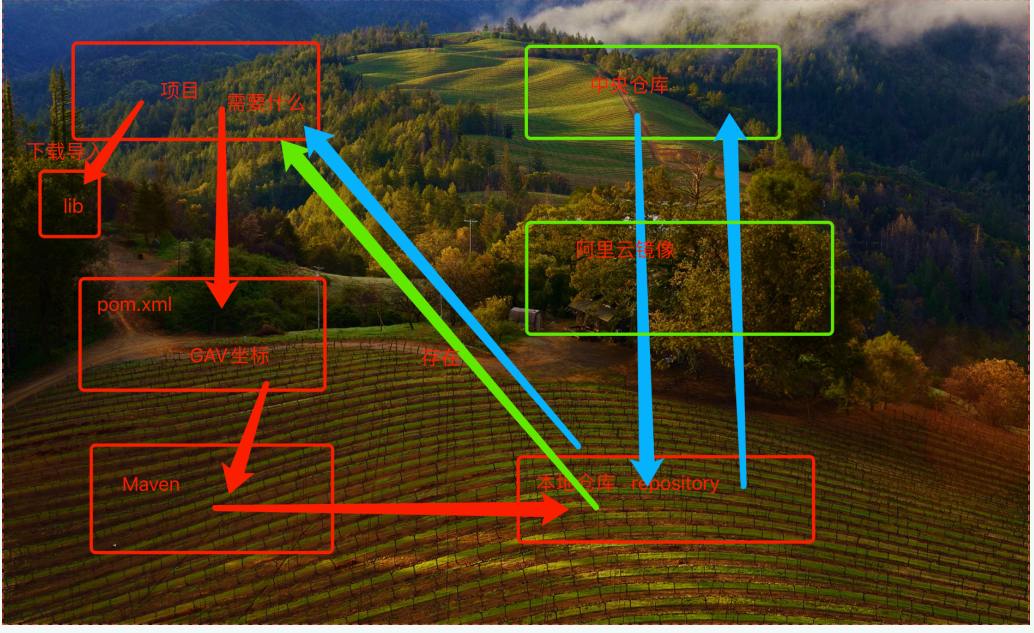
Maven:项目管理工具(解压即可)
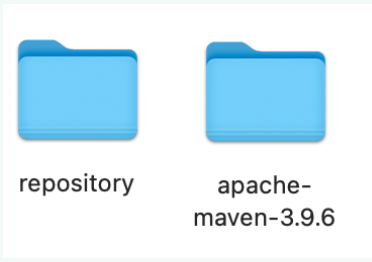
创建本地仓库repository空⽂件夹(注意:与Maven在同一目录)

在Maven目录先/conf/settings.xml里,在53行左右插入:
1
<localRepository>本地路径/repository</localRepository>
配置阿里云镜像,在161行插入:
1
2
3
4
5
6<mirror>
<id>alimaven</id>
<mirrorOf>central</mirrorOf>
<name>aliyun maven</name>
<url>http://maven.aliyun.com/nexus/content/groups/public/</url>
</mirror>保存
2.创建web项目
2.1 创建web项目
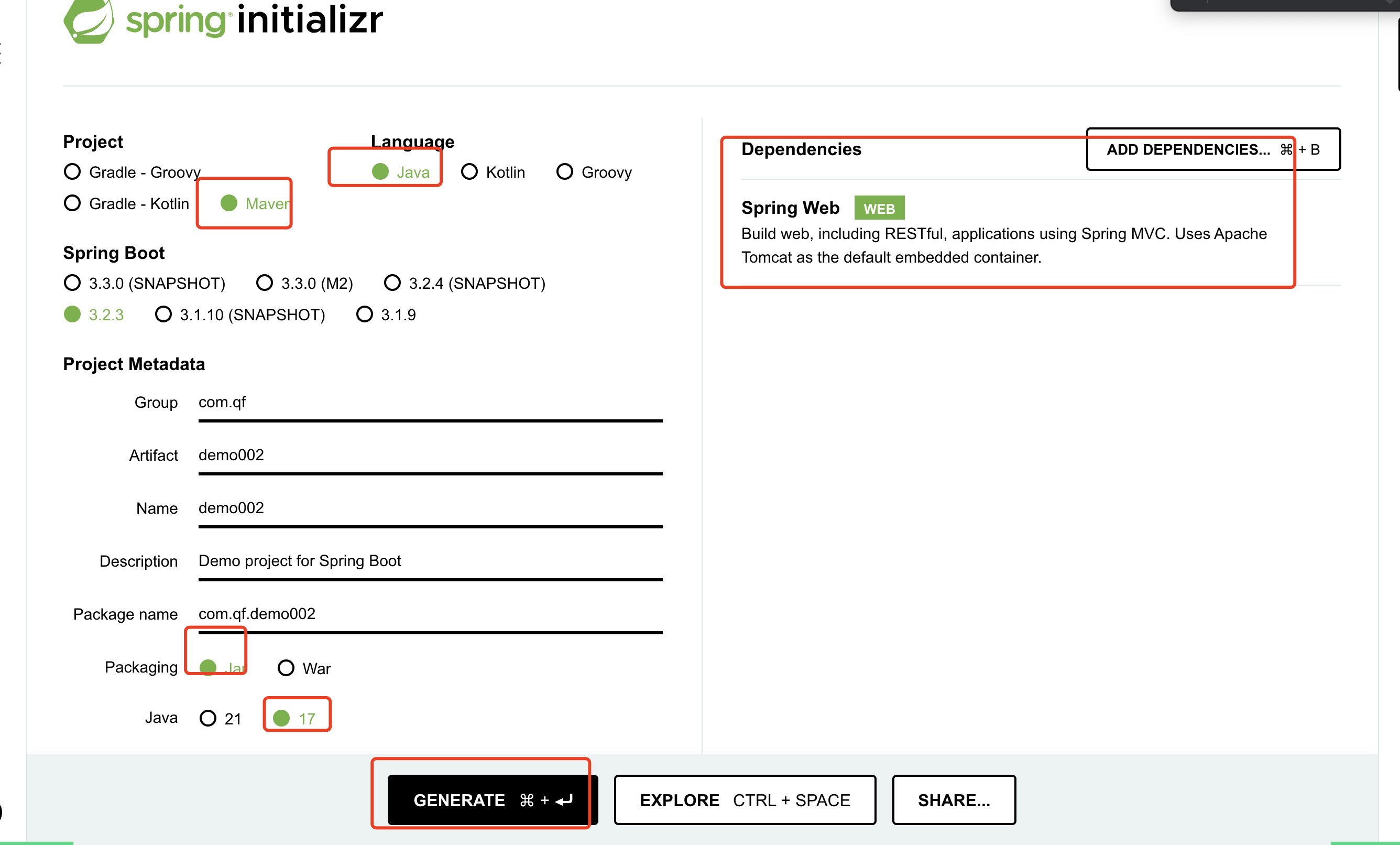
根据下图所示进行设置并下载(资源damo01)
添加到Idea中
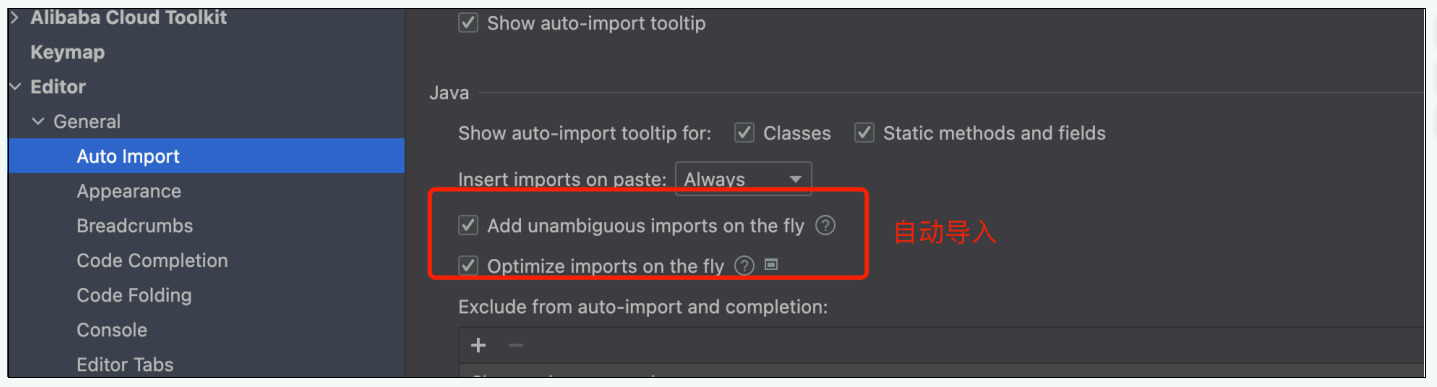
2.2 Idea的配置
自动配置
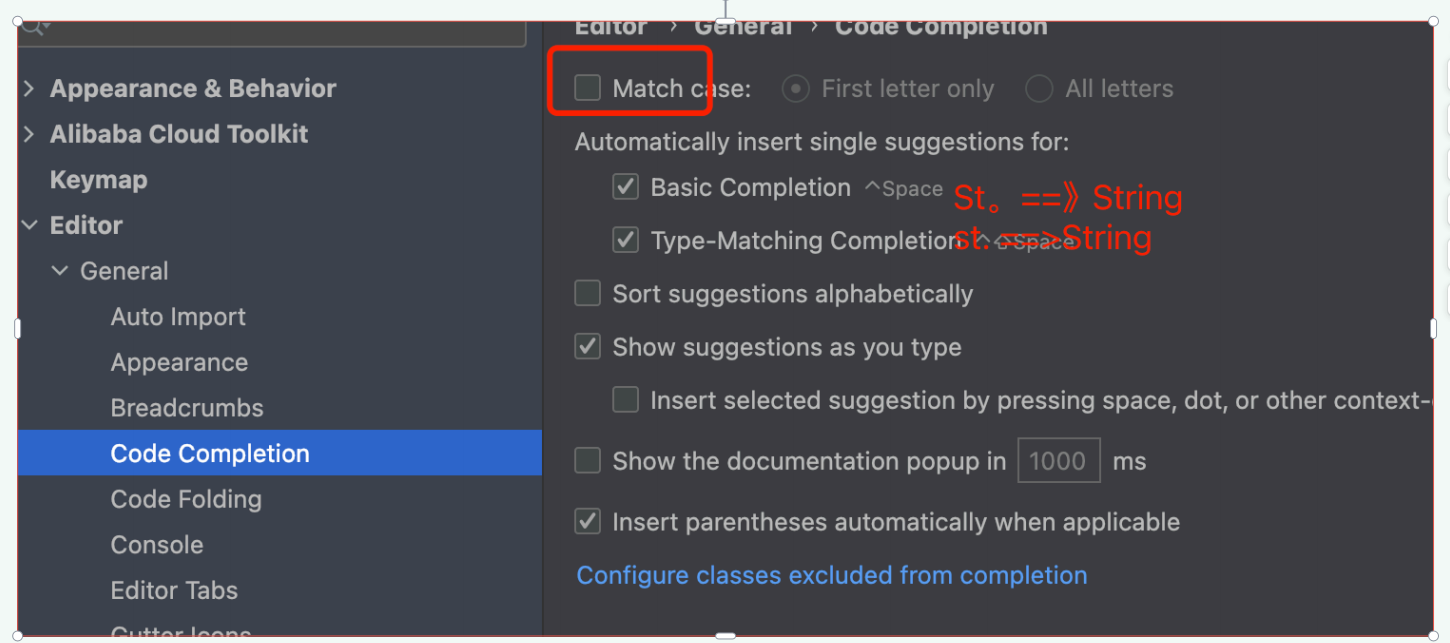
不区分大小写
maven配置
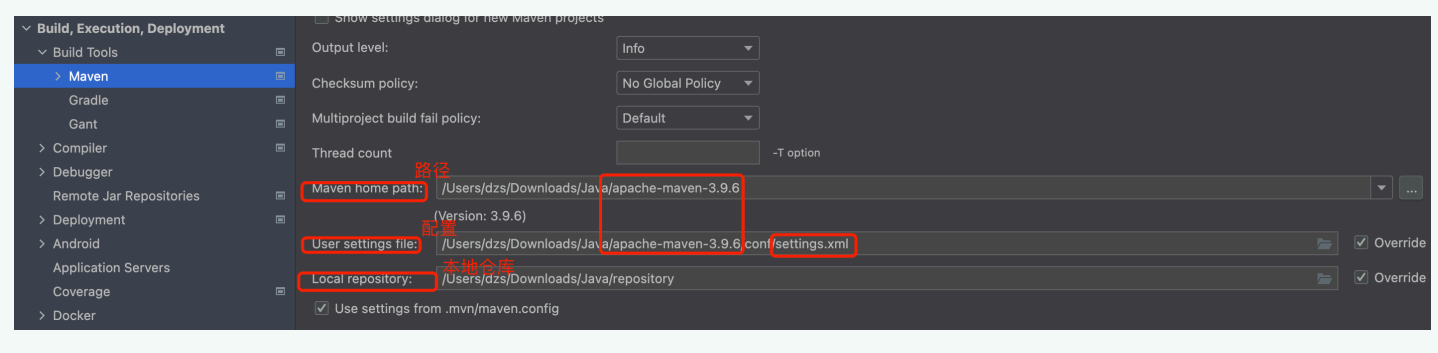
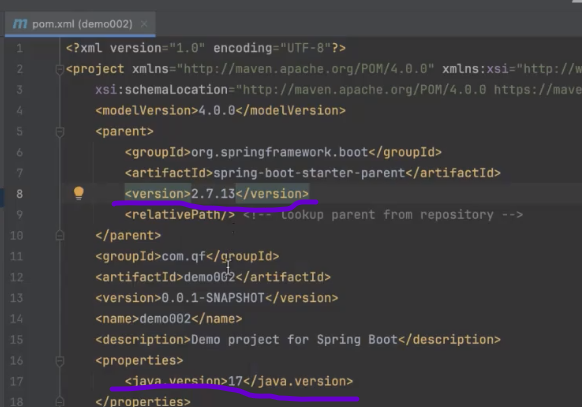
在pom.xml文件下修改以下两个版本号,运行项目
3.pom.xml结构
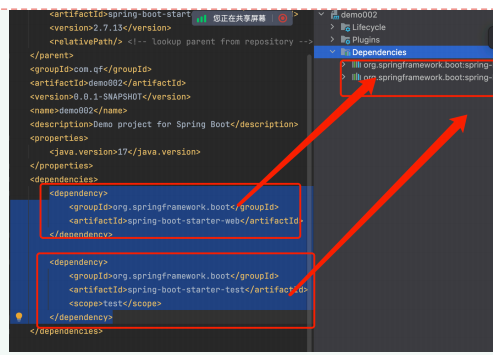
依赖:
MySQL的依赖
1
2
3
4
5<dependency>
<groupId>mysql</groupId>
<artifactId>mysql-connector-java</artifactId>
<version>8.0.29</version>
</dependency>找依赖的网址:https://mvnrepository.com/
maven管理项目
4.项目的构建
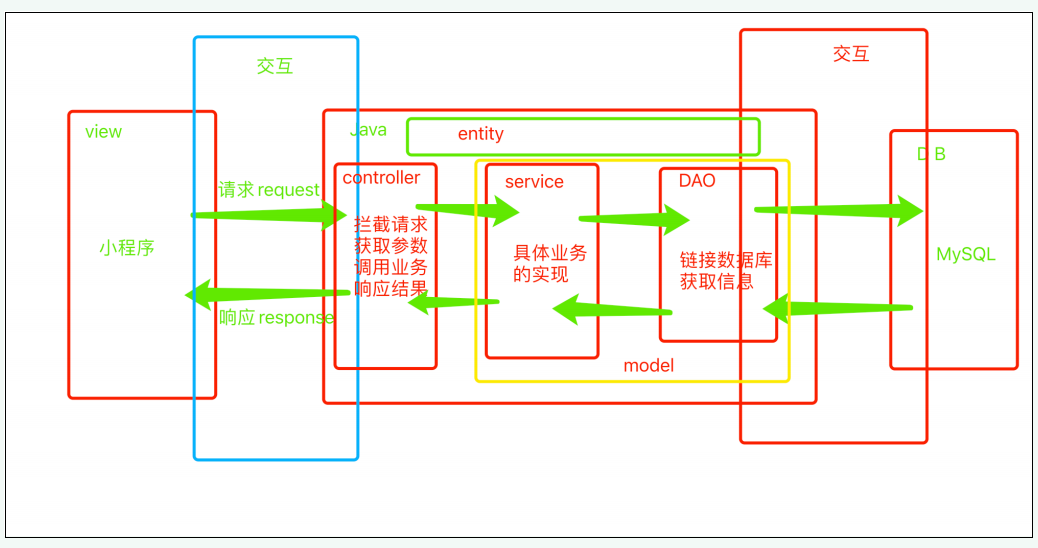
4.1 项目的执行流程
4.2 项目的构建
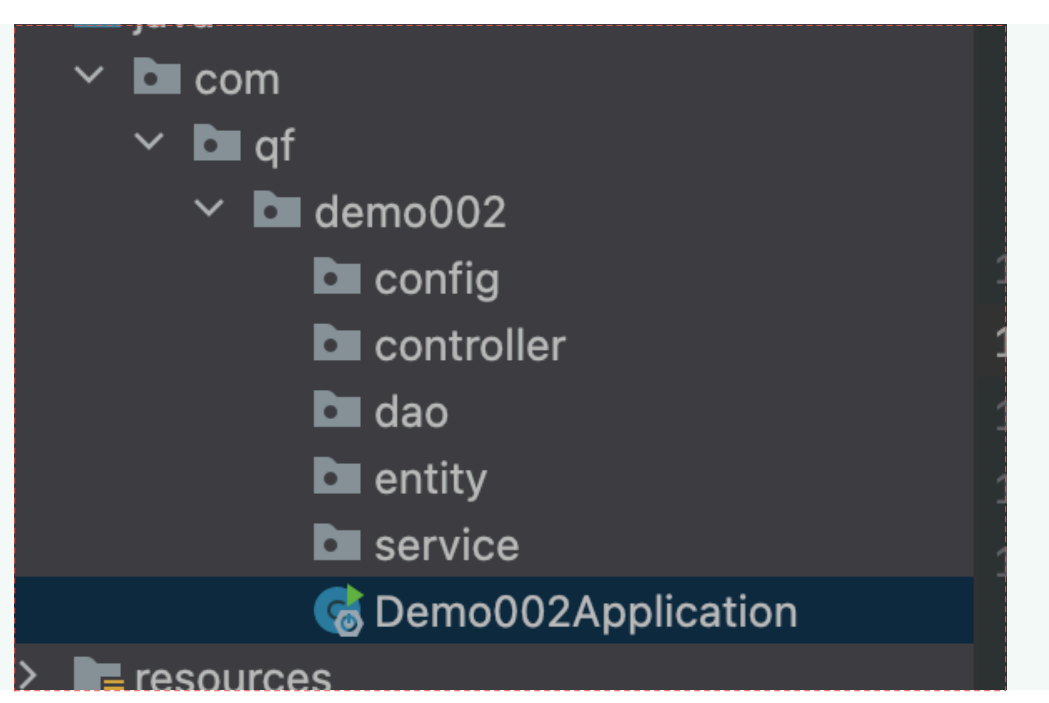
在demo下创建5个包:config,controller,dao,entity,service
5.controller交互springmvc
- 拦截请求
- 导入springmvc依赖(已有)
2
3
4
<groupId>org.springframework.boot</groupId>
<artifactId>spring-boot-starter-web</artifactId>
></dependency>
- 创建类并且添加controller注解
- @RequestMapping()适配请求地址。——> restful设计风格
2
3
4
5
6
7
8
9
10
11
12
* url: http://localhost:8080/test
*
* restful设计风格(请求方式)
*增 post
*删 delete
*改 put
*查 get
*/
> //第一级适配地址请求地址注:当端口号被占用的时候,在resource/application.properties文件中添加
下载apifox软件
- 获取参数
- 获取参数——>获取用户请求数据
- 参数的名称保持⼀致。key——value键值对
- 路径传参 @PathVariable
2
3
4
5
6
7
8
9
10
11
12
13
14
15
16
17
18
19
20
21
22
23
24
25
26
public void getTest(String username,String password){
System.out.println("查询单个信息");
System.out.println(username+password);
}
public void getAllTest( String name, String word){
System.out.println("查询所有信息");
System.out.println(name + word);
}
public void addTest(){
System.out.println("增加信息");
}
public void deleteTest(){
System.out.println("删除信息");
}
public void updataTest(){
System.out.println("更新信息");
}
- 响应结果
响应⻚⾯/数据(给前端返回数据,前后端不分离)
返回页面
导⼊thymeleaf模版引擎依赖。
2
3
4
<groupId>org.springframework.boot</groupId>
<artifactId>spring-boot-starter-thymeleaf</artifactId>
</dependency>创建新⻚⾯——>存放在templates⽂件中
创建一个index.html
2
3
4
5
6
7
8
9
10
<html lang="en">
<head>
<meta charset="UTF-8">
<title>首页</title>
</head>
<body>
hello world
</body>
</html>定义返回⻚⾯的⽅法
url:http://localhost:8080/user/topage
return”⻚⾯名称”;
2
3
4
5
6
7
* 返回主页面
*/
public String toPage(){
return "index";
}返回数据
添加注解@ResponseBody(返回数据为JSON、XML)
url:http://localhost:8080/user/todata
2
3
4
5
6
7
8
* 返回数据
*/
public String toData(){
return "index";
}封装实体类
2
3
4
5
6
7
8
9
10
11
12
13
14
15
16
17
18
19
20
21
22
23
24
25
26
27
28
29
30
31
32
33
34
35
36
37
38
39
40
41
42
43
44
45
46
47
48
49
50
51
52
53
54
55
56
57
58
59
60
61
62
63
64
65
66
67
68
// 属性
private int id;
private String username;
private String password;
private String sex;
// 构造
public User(){
}
public User(int id, String username, String password, String sex) {
this.id = id;
this.username = username;
this.password = password;
this.sex = sex;
}
// get,set
public int getId() {
return id;
}
public void setId(int id) {
this.id = id;
}
public String getUsername() {
return username;
}
public void setUsername(String username) {
this.username = username;
}
public String getPassword() {
return password;
}
public void setPassword(String password) {
this.password = password;
}
public String getSex() {
return sex;
}
public void setSex(String sex) {
this.sex = sex;
}
//重写tostring
public String toString() {
return "User{" +
"id=" + id +
", username='" + username + '\'' +
", password='" + password + '\'' +
", sex='" + sex + '\'' +
'}';
}
- JSON参数的获取
2
3
4
5
6
7
8
9
10
//例如:
public User addTest( User user){
System.out.println("增加信息");
return user;
}
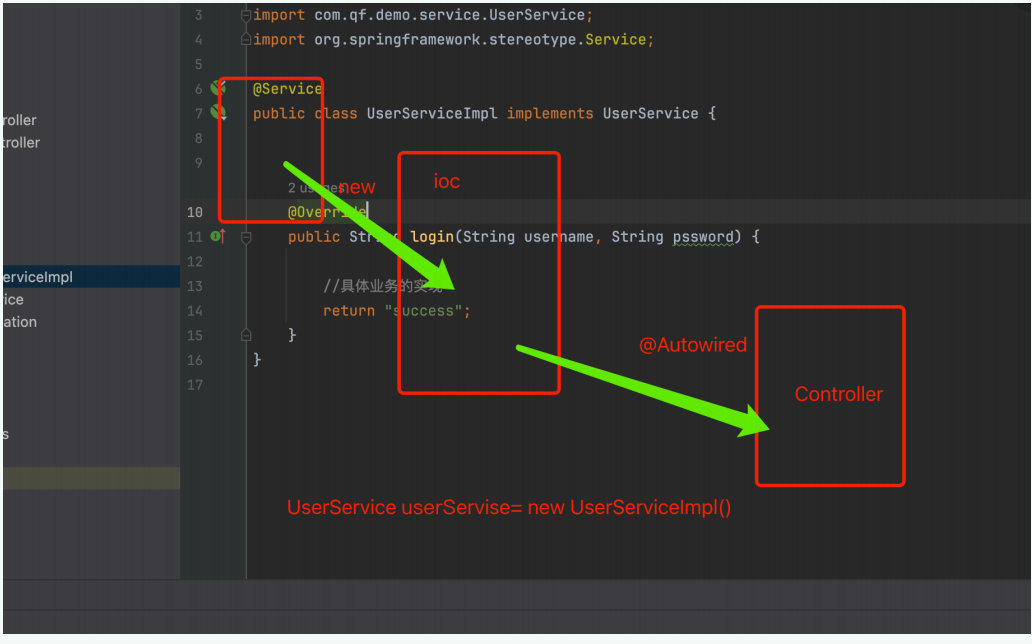
- 调用业务(要有业务层)
登录业务 (⽤户user)
url:http://localhost:8080/user/login?username=admin&password=123456
UserController拦截请求
创建业务层
创建接⼝定义⽅法
创建实现类实现⽅法
业务层对象的实例化(new 对象) @Autowired
调⽤⽅法得到结果
6.JDBC链接数据库
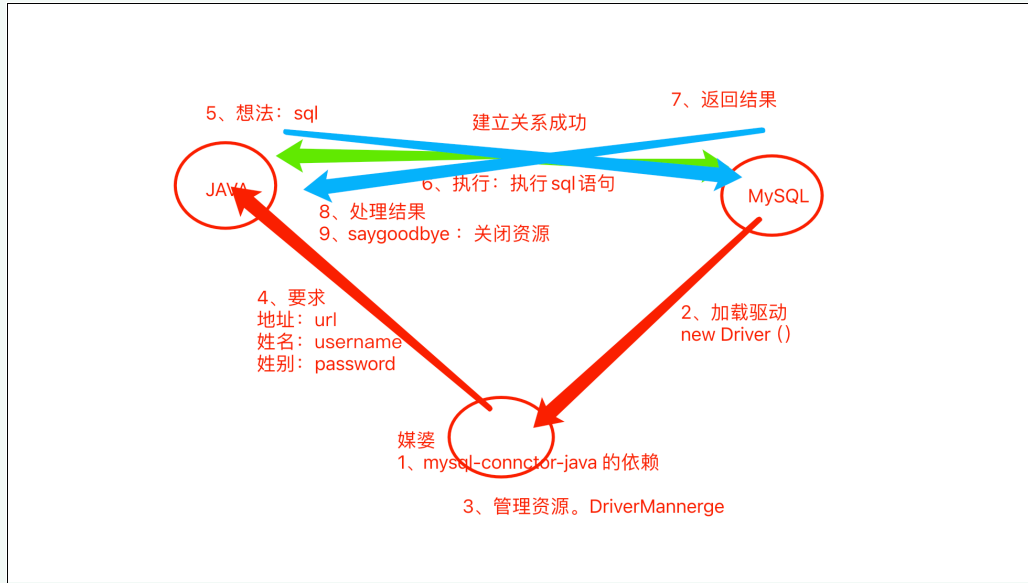
安装Navicat,并且创建数据库
代码
1
2
3
4
5
6
7
8
9
10
11
12
13
14
15
16
17
18
19
20
21
22
23
24
25
26
27
public static void main(String[] args) {
try {
Driver driver = new Driver();
DriverManager.registerDriver(driver);
Connection connection = DriverManager.getConnection("jdbc:mysql://localhost:3306/demo01?serverTimezone=Asia/Shanghai", "root", "root");
PreparedStatement preparedStatement = connection.prepareStatement("select * from t_user");
ResultSet resultSet = preparedStatement.executeQuery();
while (resultSet.next()){
int id = resultSet.getInt(1);
String name = resultSet.getString(2);
String password = resultSet.getString(3);
String sex = resultSet.getString(4);
User user = new User(id, name, password, sex);//封装对象
System.out.println(user);
}
} catch (Exception e) {
throw new RuntimeException(e);
}
}
7.mybatis半映色框架
配置MySQL(在全局文件)
1
2
3
4spring.datasource.driver-class-name=com.mysql.cj.jdbc.Driver
spring.datasource.url=jdbc:mysql://localhost:3306/demo01?serverTimezone=Asia/Shanghai
spring.datasource.username=root
spring.datasource.password=root导入mybatis依赖
1
2
3
4
5<dependency>
<groupId>org.mybatis.spring.boot</groupId>
<artifactId>mybatis-spring-boot-starter</artifactId>
<version>2.2.2</version>
</dependency>创建dao
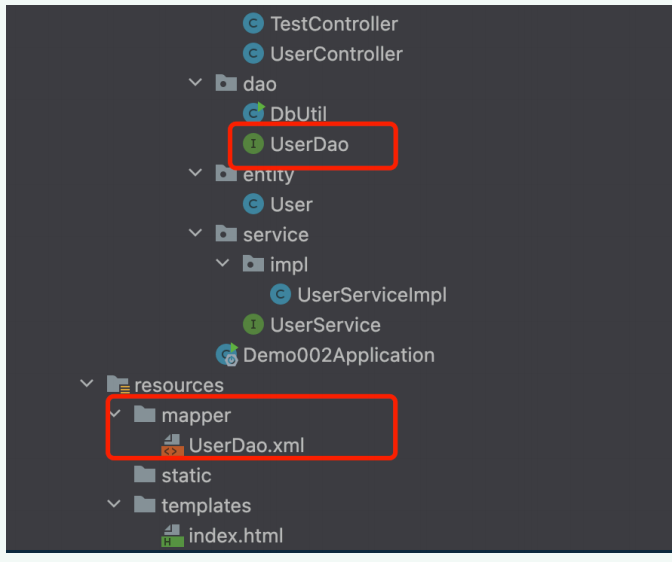
dao.xml文件的基础配置
1
2
3
4
5
6
7
8
9
10
11
<!--namespace:映射具体接口的全限定类名-->
<mapper namespace="com.qf.demo002.dao.ScoreDao">
</mapper>配置 扫描dao 和mapper
1
2
3
4
5//Application文件
@MapperScan("com.qf.demo002.dao")
//全局文件
mybatis.mapper-locations=classpath:mapper/*.xml
8.基本登录API的实现
Url:http://localhost:8080/user/login?username=admin&password=123456
参数:username=admin&password=123456
- controller user==》login()
2
3
4
5
6
7
8
9
>
>public String login(String username,String password){
>//调⽤业务 得到结果
>//UserService userService = new UserServiceImpl();
>String result = userService.login(username, password);
>//响应结果
>return result;
>}
Service
- interface ==》定义⽅法名
- impl 实现类 ==》具体业务的实现(interface的⽅法)
2
3
4
5
6
7
8
9
10
11
12
13
14
15
16
17
18
19
20
21
22
>public class UserServiceImpl implements UserService {
>
>private UserDao userDao;
>
>public String login(String username, String password) {
>//具体业务的实现
>//判断⽤户是否存在 通过⽤户名(客户端输⼊的⽤户名) 获取数据库⽤户信息(dao 链接数据库与
>数据库进⾏交互)
>User user = userDao.login(username);
>if (user!=null){
>//判断密码是否正确
>if (password.equals(user.getPassword())){
>return "success";
}else{
>return "密码错误";
}
}else{
return "⽤户不存在";
}
}
}
- userDao.interface =>定义⽅法名
2
3
4
>//通过⽤户名获取⽤户信息
>User login(String name);
}
- UserDao.xml
2
3
4
5
6
7
8
9
10
11
12
><!DOCTYPE mapper
PUBLIC "-//mybatis.org//DTD Mapper 3.0//EN"
"http://mybatis.org/dtd/mybatis-3-mapper.dtd">
><!--namespace:映射具体接口的全限定类名-->
><mapper namespace="com.hqh.demo001.dao.UserDao">
<!-- id:对应⽅法名 resultType:返回结果类型 (集合返回它的范型) #{参数名(⼀致)}-->
<select id="login" resultType="com.hqh.demo001.entity.User">
select * from t_user where username=#{name}
</select>
></mapper>
9.新建表,实现各类⽂件的创建

- 封装实体类
2
3
4
5
6
7
8
9
10
11
12
13
14
15
16
17
18
19
20
21
22
23
24
25
26
27
28
29
30
31
32
33
34
35
36
37
38
39
40
41
42
43
44
45
46
47
48
49
50
51
52
53
54
55
56
57
58
59
60
61
62
63
64
65
>public class TScore {
private int id;
private String cname;
private String idcard;
private int score;
public TScore() {
}
public TScore(int id, String cname, String idcard, int score) {
this.id = id;
this.cname = cname;
this.idcard = idcard;
this.score = score;
}
public int getId() {
return id;
}
public void setId(int id) {
this.id = id;
}
public String getCname() {
return cname;
}
public void setCname(String cname) {
this.cname = cname;
}
public String getIdcard() {
return idcard;
}
public void setIdcard(String idcard) {
this.idcard = idcard;
}
public int getScore() {
return score;
}
public void setScore(int score) {
this.score = score;
}
public String toString() {
return "TScore{" +
"id=" + id +
", cname='" + cname + '\'' +
", idcard='" + idcard + '\'' +
", score=" + score +
'}';
}
>}
- 创建各层类
- ScoreController
2
3
4
public class ScoreController {
}
- ScoreService
2
}
- ScoreServiceImpl
2
3
public class ScorceServiceImpl implements ScoreService {
}
- ScoreDao
2
}
- ScoreDao.xml
2
3
4
5
6
7
<!DOCTYPE mapper
PUBLIC "-//mybatis.org//DTD Mapper 3.0//EN"
"http://mybatis.org/dtd/mybatis-3-mapper.dtd">
<!--namespace:映射具体接⼝的全限定类名-->
<mapper namespace="com.qf.demo002.dao.ScoreDao">
</mapper>
10.实现增删改查的api
- 查询所有
⽆参数
返回值类型 成绩集合
- 根据id查询成绩信息
参数为键值对id=1
返回值类型:成绩对象
- 通过id删除单条成绩
参数:id
返回值类型字符串
- 修改成绩信息
参数:score对象. 获取json格式数据(对象) @RequestBody
返回值:String
2
3
4
5
6
"id":1,
"cname":"⼆班",
"idcard":"2022102007",
"score":99
}
- 增添单个成绩
参数:score对象. Json
返回值:boolean。 string
2
3
4
5
6
"id":1,
"cname":"⼆班",
"idcard":"2022102008",
"score":98
}
12.前端
13.项目实现
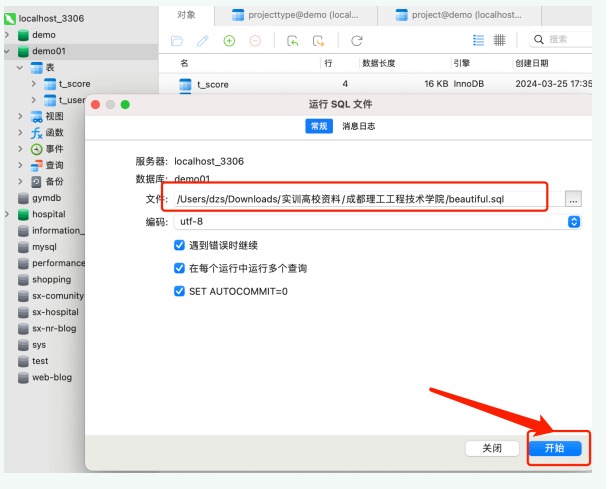
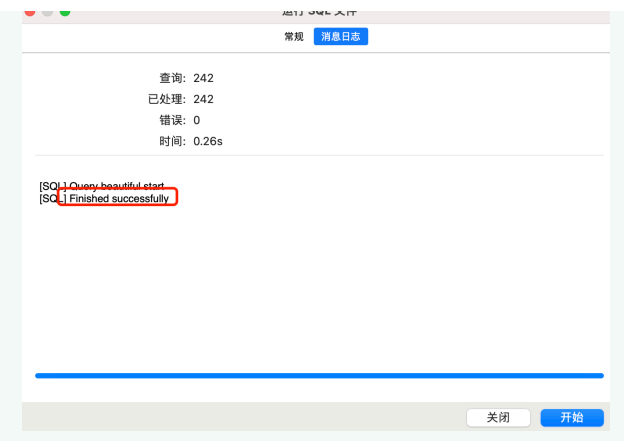
- 数据库的导入
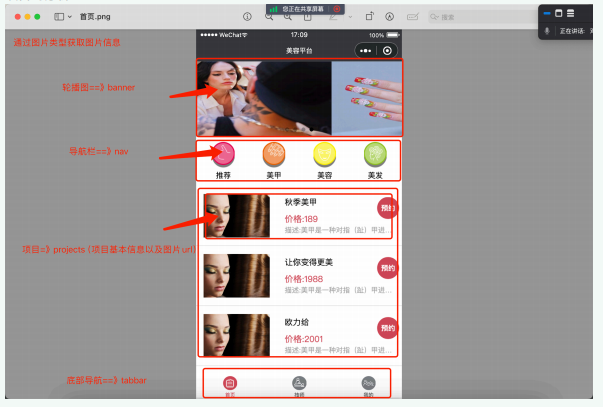
- 项目的分析
- 设计API
通过图⽚类型获取图⽚信息
url:http://localhost:8080/image/getByImageType?imagetype=banner
参数:imagetype ==》String
返回值:ArrayList
获取所有项⽬信息(项⽬基本信息以及图⽚)(项⽬表与图⽚表有关系⼀对⼀的关系==》联表查询)
参数:⽆参数
返回值类型:ArrayList
通过导航栏获取项⽬信息
参数:项⽬类型protype==》String
返回值类型:ArrayList
通过项⽬id获取项⽬信息
参数:id===》int
返回值类型:Project
- 实现API
封装实体类
2
3
4
5
6
7
8
9
10
11
12
13
14
15
16
17
18
19
20
21
22
23
24
25
26
27
28
29
30
31
32
33
34
35
36
37
38
39
40
41
42
43
44
45
46
47
48
49
50
51
52
53
54
55
56
57
58
59
60
61
62
63
64
65
66
67
68
69
70
71
72
public class TImage {
private int id;
private String imageurl;
private String imagetitle;
private String imagetype;
private String imagestate;
public TImage() {
}
public TImage(int id, String imageurl, String imagetitle, String imagetype, String imagestate) {
this.id = id;
this.imageurl = imageurl;
this.imagetitle = imagetitle;
this.imagetype = imagetype;
this.imagestate = imagestate;
}
public int getId() {
return id;
}
public void setId(int id) {
this.id = id;
}
public String getImageurl() {
return imageurl;
}
public void setImageurl(String imageurl) {
this.imageurl = imageurl;
}
public String getImagetitle() {
return imagetitle;
}
public void setImagetitle(String imagetitle) {
this.imagetitle = imagetitle;
}
public String getImagetype() {
return imagetype;
}
public void setImagetype(String imagetype) {
this.imagetype = imagetype;
}
public String getImagestate() {
return imagestate;
}
public void setImagestate(String imagestate) {
this.imagestate = imagestate;
}
public String toString() {
return "TImage{" +
"id=" + id +
", imageurl='" + imageurl + '\'' +
", imagetitle='" + imagetitle + '\'' +
", imagetype='" + imagetype + '\'' +
", imagestate='" + imagestate + '\'' +
'}';
}
}创建控制层
2
3
4
5
6
7
8
public class ImageController {
private ImageService imageService;
}创建业务层
接口
2
}实现类
2
3
4
5
public class ImageServiceImpl implements ImageService {
private ImageDao imageDao;
}创建数据持久层
接口
2
}映射文件(接口的实现)
2
3
4
5
6
7
<!--namespace:映射具体接⼝的全限定类名-->
<mapper namespace="com.qf.demo002.dao.ImageDao">
</mapper>以下是整个项目的代码:
- 首先是Demo001Application文件
2
3
4
5
6
7
8
9
10
11
12
13
14
15
16
import org.mybatis.spring.annotation.MapperScan;
import org.springframework.boot.SpringApplication;
import org.springframework.boot.autoconfigure.SpringBootApplication;
public class Demo001Application {
public static void main(String[] args) {
SpringApplication.run(Demo001Application.class, args);
}
}
- entity文件夹下:
TImage文件
2
3
4
5
6
7
8
9
10
11
12
13
14
15
16
17
18
19
20
21
22
23
24
25
26
27
28
29
30
31
32
33
34
35
36
37
38
39
40
41
42
43
44
45
46
47
48
49
50
51
52
53
54
55
56
57
58
59
60
61
62
63
64
65
66
67
68
69
70
71
72
public class TImage {
private int id;
private String imageurl;
private String imagetitle;
private String imagetype;
private String imagestate;
public TImage() {
}
public TImage(int id, String imageurl, String imagetitle, String imagetype, String imagestate) {
this.id = id;
this.imageurl = imageurl;
this.imagetitle = imagetitle;
this.imagetype = imagetype;
this.imagestate = imagestate;
}
public int getId() {
return id;
}
public void setId(int id) {
this.id = id;
}
public String getImageurl() {
return imageurl;
}
public void setImageurl(String imageurl) {
this.imageurl = imageurl;
}
public String getImagetitle() {
return imagetitle;
}
public void setImagetitle(String imagetitle) {
this.imagetitle = imagetitle;
}
public String getImagetype() {
return imagetype;
}
public void setImagetype(String imagetype) {
this.imagetype = imagetype;
}
public String getImagestate() {
return imagestate;
}
public void setImagestate(String imagestate) {
this.imagestate = imagestate;
}
public String toString() {
return "TImage{" +
"id=" + id +
", imageurl='" + imageurl + '\'' +
", imagetitle='" + imagetitle + '\'' +
", imagetype='" + imagetype + '\'' +
", imagestate='" + imagestate + '\'' +
'}';
}
}Project文件
2
3
4
5
6
7
8
9
10
11
12
13
14
15
16
17
18
19
20
21
22
23
24
25
26
27
28
29
30
31
32
33
34
35
36
37
38
39
40
41
42
43
44
45
46
47
48
49
50
51
52
53
54
55
56
57
58
59
60
61
62
63
64
65
66
67
68
69
70
71
72
73
74
75
76
77
78
79
80
81
82
83
84
85
86
87
88
89
90
91
92
93
94
95
96
97
98
99
100
101
102
103
104
105
106
107
108
109
110
111
112
113
114
115
116
117
118
119
120
121
122
123
124
125
126
127
128
129
130
131
132
133
134
135
136
137
138
139
140
141
142
143
144
145
146
147
148
public class Project {
private int id;
private String proexplain;
private Double proprice;
private String prostep;
private int protypeid;
private String proname;
private int imageid;
private String prostatus;
private int busid;
private int tecid;
private String imageurl;
public Project() {
}
public Project(int id, String proexplain, Double proprice, String prostep, int protypeid, String proname, int imageid, String prostatus, int busid, int tecid, String imageurl) {
this.id = id;
this.proexplain = proexplain;
this.proprice = proprice;
this.prostep = prostep;
this.protypeid = protypeid;
this.proname = proname;
this.imageid = imageid;
this.prostatus = prostatus;
this.busid = busid;
this.tecid = tecid;
this.imageurl = imageurl;
}
public int getId() {
return id;
}
public void setId(int id) {
this.id = id;
}
public String getProexplain() {
return proexplain;
}
public void setProexplain(String proexplain) {
this.proexplain = proexplain;
}
public Double getProprice() {
return proprice;
}
public void setProprice(Double proprice) {
this.proprice = proprice;
}
public String getProstep() {
return prostep;
}
public void setProstep(String prostep) {
this.prostep = prostep;
}
public int getProtypeid() {
return protypeid;
}
public void setProtypeid(int protypeid) {
this.protypeid = protypeid;
}
public String getProname() {
return proname;
}
public void setProname(String proname) {
this.proname = proname;
}
public int getImageid() {
return imageid;
}
public void setImageid(int imageid) {
this.imageid = imageid;
}
public String getProstatus() {
return prostatus;
}
public void setProstatus(String prostatus) {
this.prostatus = prostatus;
}
public int getBusid() {
return busid;
}
public void setBusid(int busid) {
this.busid = busid;
}
public int getTecid() {
return tecid;
}
public void setTecid(int tecid) {
this.tecid = tecid;
}
public String getImageurl() {
return imageurl;
}
public void setImageurl(String imageurl) {
this.imageurl = imageurl;
}
public String toString() {
return "Project{" +
"id=" + id +
", proexplain='" + proexplain + '\'' +
", proprice=" + proprice +
", prostep='" + prostep + '\'' +
", protypeid=" + protypeid +
", proname='" + proname + '\'' +
", imageid=" + imageid +
", prostatus='" + prostatus + '\'' +
", busid=" + busid +
", tecid=" + tecid +
", imageurl='" + imageurl + '\'' +
'}';
}
}
- controller文件夹下:
ImageController
2
3
4
5
6
7
8
9
10
11
12
13
14
15
16
17
18
19
20
21
22
23
24
25
26
27
28
import com.hqh.demo001.entity.TImage;
import com.hqh.demo001.service.ImageService;
import org.springframework.beans.factory.annotation.Autowired;
import org.springframework.stereotype.Controller;
import org.springframework.web.bind.annotation.RequestMapping;
import org.springframework.web.bind.annotation.ResponseBody;
import java.util.ArrayList;
public class ImageController {
private ImageService imageService;
public ArrayList<TImage> getByImageType(String imagetype){
ArrayList<TImage> tImages = imageService.getByImageType(imagetype);
return tImages;
}
}ProjectController
2
3
4
5
6
7
8
9
10
11
12
13
14
15
16
17
18
19
20
21
22
23
24
25
26
27
28
29
30
31
32
33
34
35
36
37
38
39
40
41
import com.hqh.demo001.entity.Project;
import com.hqh.demo001.service.ProjectService;
import org.springframework.beans.factory.annotation.Autowired;
import org.springframework.stereotype.Controller;
import org.springframework.web.bind.annotation.RequestMapping;
import org.springframework.web.bind.annotation.ResponseBody;
import java.util.ArrayList;
public class ProjectController {
private ProjectService projectService;
public ArrayList<Project> getAll(){
ArrayList<Project> projects = projectService.getAll();
return projects;
}
public ArrayList<Project> getByType(String name){
ArrayList<Project> projects = projectService.getByType(name);
return projects;
}
public Project getById(int id){
Project project = projectService.getById(id);
return project;
}
}
- service文件夹下:
ImageService接口
2
3
4
5
6
7
8
9
10
import com.hqh.demo001.entity.TImage;
import java.util.ArrayList;
public interface ImageService {
ArrayList<TImage> getByImageType(String imagetype);
}ProjectController接口
2
3
4
5
6
7
8
9
10
11
12
13
14
import com.hqh.demo001.entity.Project;
import java.util.ArrayList;
public interface ProjectService {
ArrayList<Project> getAll();
ArrayList<Project> getByType(String name);
Project getById(int id);
}impl文件夹下
ImageServiceImpl
2
3
4
5
6
7
8
9
10
11
12
13
14
15
16
17
18
19
20
21
22
import com.hqh.demo001.dao.ImageDao;
import com.hqh.demo001.entity.TImage;
import com.hqh.demo001.service.ImageService;
import org.springframework.beans.factory.annotation.Autowired;
import org.springframework.stereotype.Service;
import java.util.ArrayList;
public class ImageServiceImpl implements ImageService {
private ImageDao imageDao;
public ArrayList<TImage> getByImageType(String imagetype) {
ArrayList<TImage> tImages = imageDao.getByImageType(imagetype);
return tImages;
}
}PrjeceServicrImpl
2
3
4
5
6
7
8
9
10
11
12
13
14
15
16
17
18
19
20
21
22
23
24
25
26
27
28
29
30
31
32
33
34
import com.hqh.demo001.dao.ProjectDao;
import com.hqh.demo001.entity.Project;
import com.hqh.demo001.service.ProjectService;
import org.springframework.beans.factory.annotation.Autowired;
import org.springframework.stereotype.Service;
import java.util.ArrayList;
public class PrjeceServicrImpl implements ProjectService {
private ProjectDao projectDao;
public ArrayList<Project> getAll() {
ArrayList<Project> projects = projectDao.getAll();
return projects;
}
public ArrayList<Project> getByType(String name) {
ArrayList<Project> projects = projectDao.getByType(name);
return projects;
}
public Project getById(int id) {
Project project = projectDao.getById(id);
return null;
}
}
- dao文件夹下
2
3
4
5
6
7
8
9
10
11
import com.hqh.demo001.entity.TImage;
import java.util.ArrayList;
public interface ImageDao {
ArrayList<TImage> getByImageType(String imagetype);
}
2
3
4
5
6
7
8
9
10
11
12
13
14
import com.hqh.demo001.entity.Project;
import java.util.ArrayList;
public interface ProjectDao {
ArrayList<Project> getAll();
ArrayList<Project> getByType(String name);
Project getById(int id);
}
- mapper文件夹下
2
3
4
5
6
7
8
9
10
11
12
<!--namespace:映射具体接⼝的全限定类名-->
<mapper namespace="com.hqh.demo001.dao.ImageDao">
<select id="getByImageType" resultType="com.hqh.demo001.entity.TImage">
select * from image where imagetype=#{imagetype}
</select>
</mapper>
2
3
4
5
6
7
8
9
10
11
12
13
14
15
16
17
18
19
20
21
<!--namespace:映射具体接⼝的全限定类名-->
<mapper namespace="com.hqh.demo001.dao.ProjectDao">
<select id="getAll" resultType="com.hqh.demo001.entity.Project">
select * from project,image where project.imageid=image.id
</select>
<select id="getByType" resultType="com.hqh.demo001.entity.Project">
select * from project,image,projecttype where project.imageid=image.id and project.projecttype.id and project.`name`=#{name}
</select>
<select id="getById" resultType="com.hqh.demo001.entity.Project">
select * from project where id=#{id}
</select>
</mapper>
前端静态页面的实现
在后端的static目录下创建images,并将后端的图片放进去(删除原有的target目录,重新编译)
创建新项目,并且删除原有pages中的文件,app.js,app.json
前端新建images文件夹下
tabbar的实现
创建pages页面(app.json),[index,tech,my,detail],注意index文件夹(要有4个文件)
app.json:
tabBat(回车)
2
3
4
5
6
7
8
9
10
11
12
13
14
15
16
17
18
19
20
21
"list": [{
"pagePath": "pages/index/index",
"text": "首页",
"iconPath": "/images/index_icon.png",
"selectedIconPath": "/images/index_icon_HL.png"
},
{
"pagePath": "pages/tech/tech",
"text": "技师",
"iconPath": "/images/skill_icon.png",
"selectedIconPath": "/images/skill_icon_HL.png"
},
{"pagePath": "pages/my/my",
"text": "我的",
"iconPath": "/images/user_icon.png",
"selectedIconPath": "/images/user_icon_HL.png"
}
]
},页面的实现
- 轮播图的实现
前后端整合